Log in
Skip to sidebar
Skip to main content
Spaces
Hit enter to search
Help
Online Help
Keyboard Shortcuts
Feed Builder
What’s new
Available Gadgets
About Confluence
Log in
iSpring LMS
Page tree
Browse pages
Configure
Space tools
View Page
Page History
Page Information
View in Hierarchy
Delete comments
View Source
Export to PDF
Pages
…
iSpring LMS
Ajustes
Opciones adicionales
Empleados
Cómo habilitar la sección "Empleados"
Page History
Versions Compared
Old Version
2
changes.mady.by.user
Alina Levitskaya
Saved on
Jun 05, 2025
compared with
New Version
3
changes.mady.by.user
Alina Levitskaya
Saved on
Jun 27, 2025
Previous Change: Difference between versions 1 and 2
Next Change: Difference between versions 3 and 4
View Page History
Key
This line was added.
This line was removed.
Formatting was changed.
...
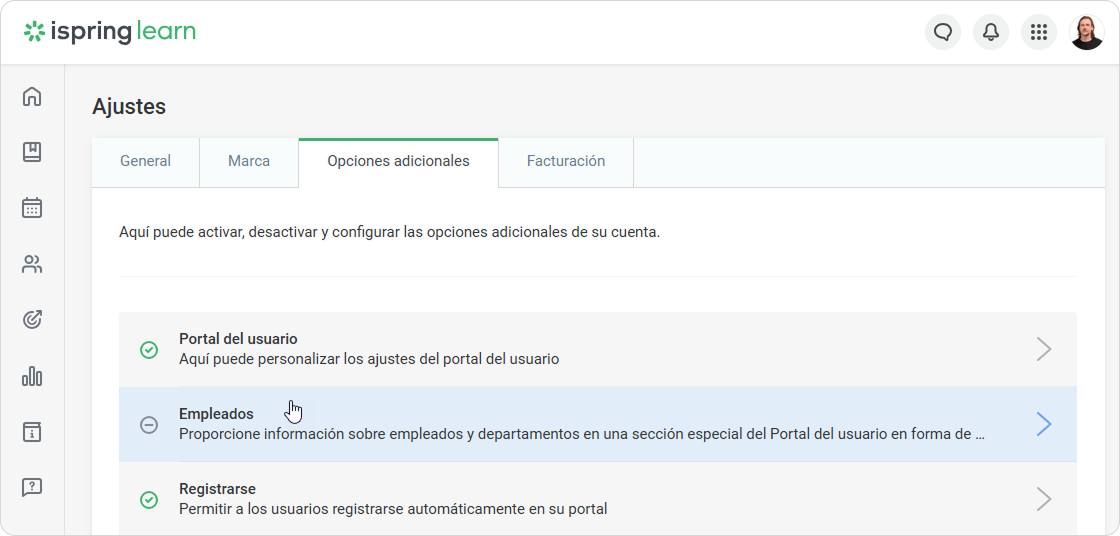
Vaya a
Ajustes
>
Opciones adicionales
>
Empleados
.
Image Added
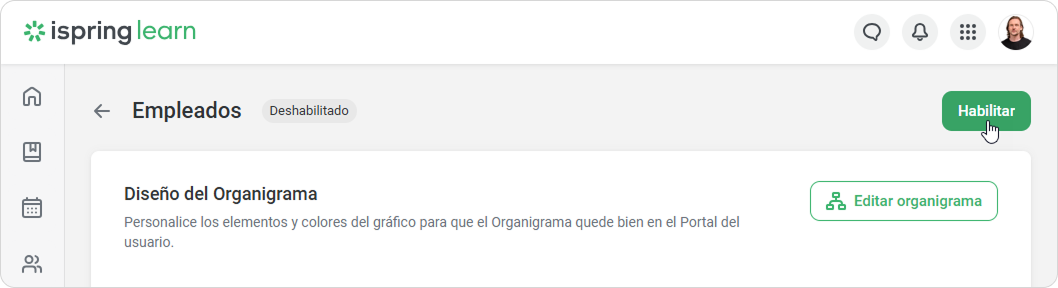
Haga clic en
Habilitar
.
Image Added
¡Genial!
Los empleados ahora podrán ver la
sección "Empleados" en el Portal del usuario.
Overview
Content Tools
{"serverDuration": 185, "requestCorrelationId": "02a16bfd845d4c88"}